 Qisthi Ramadhani
 TL;DR
PgBounceris a crucial middleware for scaling PostgreSQL, but choosing the right pooling mode makes or breaks your database concurrency. Transaction mode is the gold standard for high-traffic frameworks like Laravel as it releases connections instantly after a query, whereas session mode ties up database connections for the entire lifecycle of a client connection, limiting maximum throughput.
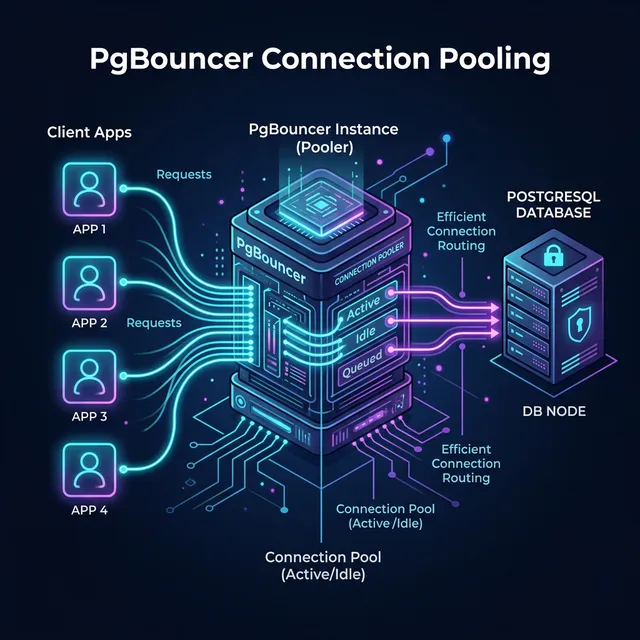
The Connection Exhaustion Problem
In modern stateless web applications built on top of Laravel, standard PHP deployments establish a new database connection for every single HTTP request. This constant connection churn hits PostgreSQL hard, rapidly depleting its max_connections limit and triggering sudden FATAL: sorry, too many clients already errors during high traffic.
Since PostgreSQL forks a new OS process for each connection, high connection counts directly consume enormous amounts of memory. To solve this, developers deploy PgBouncer, a lightweight connection pooler. But simply installing PgBouncer isn’t enough—you must configure the correct pooling mode based on your application’s architecture to actually unlock performance.
Comparing Session vs. Transaction Mode
PgBouncer operates primarily in two modes relevant to web applications:
| Feature Dimension | Session Mode (pool_mode = session) | Transaction Mode (pool_mode = transaction) |
|---|---|---|
| Connection Release Trigger | Client disconnects completely | Server COMMIT or ROLLBACK |
| Concurrency Ceiling | Low (Tied to active application clients) | Extremely High (Multiplexes 10x-100x clients) |
Session-Level State (SET) | Fully retains session states natively | Cannot reliably retain session variables |
| Temporary Tables / Advisory Locks | Fully supported across queries | Not supported across transactions |
| Prepared Statement Support | Natively supported | Supported transparently (PgBouncer v1.21+) |
| Laravel Compatibility | Okay, but limits scaling | Highly Recommended for max throughput |
Recommendation Per Use Case
When to use Session Mode
Session pooling acts exactly like a direct PostgreSQL connection. A server connection is leased to a client application logic from the moment it connects until the exact second it disconnects.
- Legacy Applications: Best for monolithic apps written with heavy reliance on PostgreSQL
SESSION-level variables,LISTEN/NOTIFY, and temporary tables. - Long-Running Tasks: Ideal for heavy scheduled reporting jobs or data warehousing queries.
- But for Laravel: You lose multiplexing benefits. If your web app scales up to 500 concurrent PHP-FPM workers, session mode still requires 500 active PgBouncer-to-PostgreSQL backend connections, eventually crashing your database.
When to use Transaction Mode (The Best Practice)
Transaction pooling is the hero of modern web scaling. A server connection is only leased to the client for the microsecond duration of a BEGIN ... COMMIT block. Once the transaction resolves, the backend connection is immediately returned to the pool for another client to use.
- Laravel/PHP Apps: Highly recommended. A pool of just 50 background database connections can easily serve 5,000+ stateless web clients.
- Microservices: Perfect for architectures with frequent, short, and discrete database queries.
- State limitations: Use
SET LOCALscoped within your transaction instead of globalSETcommands, as consecutive transactions from the same client might be routed to completely different backend connections.
Configuration Code Snippets
Here’s how to properly configure PgBouncer in your pgbouncer.ini configuration.
Bad Practice
# Bad Practice: Using session mode for a highly concurrent web application
[bases]
postgres = host=127.0.0.1 port=5432 dbname=webapp_db

[pgbouncer]
listen_port = 6432
listen_addr = 127.0.0.1
auth_type = md5
auth_file = userlist.txt

# This limits concurrency to exactly what your database can handle natively
pool_mode = session
max_client_conn = 100
default_pool_size = 20
Best Practice
# Best Practice: Transaction mode multiplexing paired with prepared statement support
[bases]
postgres = host=127.0.0.1 port=5432 dbname=webapp_db

[pgbouncer]
listen_port = 6432
listen_addr = 127.0.0.1
auth_type = md5
auth_file = userlist.txt

# Transaction mode allows massive connection multiplexing
pool_mode = transaction

# You can accept thousands of application connections
max_client_conn = 5000

# While only maintaining a small, efficient pool to the actual database
default_pool_size = 50

# Enable prepared statement tracking for high performance (PgBouncer 1.21+)
max_prepared_statements = 100